How We Scope Software Projects in 48 Hours

Most software projects fail not because the code was bad, but because the scope was wrong. Either too much was promised, too little was understood, or the thing that got built was not the thing that was needed.
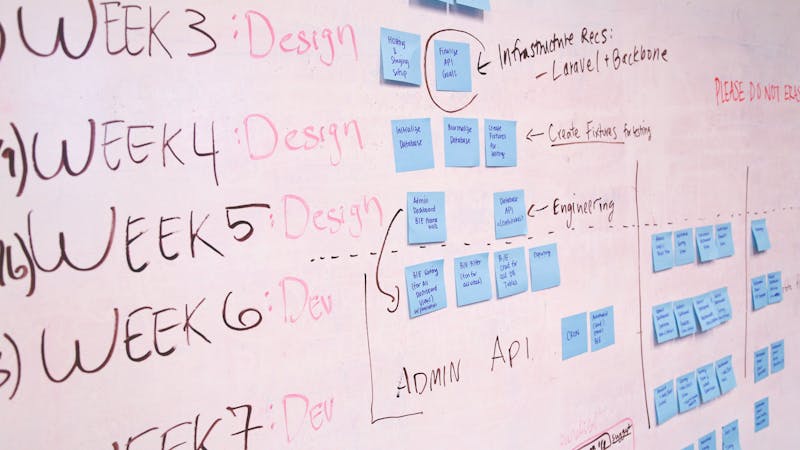
We have shipped over 12 products across five years as a studio. Every one of them started with a scoping phase. Not a formal requirements gathering exercise that takes weeks and produces a 40-page document nobody reads. We are talking about a focused 48-hour process that turns a vague idea into a concrete, buildable plan.
Here is how we do it.
Why 48 Hours
We chose 48 hours deliberately. It is long enough to think deeply about a problem, sketch architecture, and estimate effort. It is short enough to force decisions and avoid analysis paralysis.
When scoping drags on for weeks, two things happen. First, the scope itself starts to drift because every conversation adds new ideas. Second, the client loses momentum. They came to us with energy and urgency, and we want to match that.
Our 48-hour window is not a gimmick. It is a constraint that produces better output. We have seen it work on projects as varied as MindHyv, an all-in-one business platform for entrepreneurs, and JustTheRip, a digital pack-opening platform for trading card games. Wildly different products, same scoping discipline.
Phase 1: Discovery Questions (Hours 0-8)
The first phase is a structured conversation. We do not start with wireframes or architecture diagrams. We start with questions.
Here is the core set we work through:
Problem and users:
- What problem does this solve, and for whom specifically?
- How are users solving this problem today without your product?
- What is the one thing this product must do on day one?
Business model:
- How does this make money (or save money)?
- What does success look like in 90 days?
- What is the budget range and launch deadline?
Technical constraints:
- Are there existing systems this needs to integrate with?
- Are there regulatory or compliance requirements?
- What platforms (web, mobile, both)?
Scope boundaries:
- What is explicitly out of scope for v1?
- What features feel important but could wait for v2?
- What would make you consider this project a failure?
That last question is the most important one. It forces the client to articulate what actually matters versus what sounds nice. When we scoped Trackelio, a customer feedback platform, the answer was clear: if product teams cannot get from feedback to action in under two minutes, we have failed. That single constraint shaped every architecture decision.
We capture all of this in a shared document during the call, not after. The client sees what we are writing in real time. No telephone game.

Phase 2: System Sketching (Hours 8-24)
With discovery complete, we move to system sketching. This is not full architecture design. It is a high-level map of the system’s moving parts.
We sketch three things:
1. Entity map. What are the core data objects and how do they relate? For a marketplace like Vincelio, this was: creators, brands, campaigns, deliverables, payments. For a freelancer workspace like LancerSpace, it was: contacts, proposals, invoices, projects, time entries.
We keep this to a simple list with relationships:
User
  has_many Workspaces (tenant boundary)

Workspace
  has_many Projects
  has_many Clients
  has_many Invoices

Project
  belongs_to Client
  has_many Tasks
  has_many TimeEntries

Invoice
  belongs_to Client
  has_many LineItems
  references Projects (optional)
2. Screen inventory. We list every distinct screen the application needs, grouped by user role. Not wireframes, just a list. This is surprisingly clarifying because it forces you to think through every user flow.
## Screens — Admin Role
- Dashboard (overview metrics)
- Project list + detail
- Client list + detail
- Invoice builder
- Settings (workspace, billing, team)

## Screens — Client Role (portal)
- Project status view
- Invoice history + payment
- File/deliverable access
3. Integration map. What external services does this system talk to? Auth provider, payment processor, email service, file storage, analytics. We list these explicitly because they carry integration effort that is easy to underestimate.
Phase 3: Estimation (Hours 24-40)
This is where most studios get it wrong. They either estimate too precisely too early (pretending they know exactly how long a feature takes before writing any code) or too loosely (just guessing a total number).
We use a two-pass approach.
Pass 1: T-shirt sizing. Every item from the screen inventory and integration map gets a size: S, M, L, or XL. We define these relative to our team:
- S — Less than a day. Straightforward CRUD, standard patterns.
- M — 1-3 days. Some complexity, maybe a non-trivial UI component or business logic.
- L — 3-5 days. Significant complexity. Custom algorithms, complex state management, third-party integration with edge cases.
- XL — 5+ days. Needs to be broken down further. If something is XL, it is a sign we do not understand it well enough yet.
We do this sizing as a team. All four engineers weigh in. If there is disagreement on a size, that is a signal we need to discuss it more.
Pass 2: Hour ranges. After t-shirt sizing, we convert to hour ranges. Not single numbers, ranges. A Medium is not “16 hours.” It is “12-24 hours.” This honesty about uncertainty is critical.
We then sum the ranges to get a total project range. A typical MVP might look like:
Auth + onboarding:          M    12-24h
Dashboard:                  M    12-24h
Core feature (projects):    L    24-40h
Core feature (invoicing):   L    24-40h
Client portal:              M    12-24h
Stripe integration:         M    16-24h
Email notifications:        S     4-8h
Settings + admin:           S     6-12h
Deployment + DevOps:        S     4-8h
                           ─────────────
Total:                          110-204h
We always quote the range, not the midpoint. If a client cannot work with the upper end of the range, we know we need to cut scope before we start, not after.

Phase 4: The Scope Document (Hours 40-48)
The final deliverable is a scope document. Not a contract. Not a spec. A scope document.
Here is the structure we use:
# Project Scope: [Project Name]
## Date: YYYY-MM-DD
## Prepared by: Threshline

### 1. Project Overview
One paragraph describing what this is and who it serves.

### 2. Goals and Success Criteria
3-5 measurable outcomes.

### 3. User Roles
List of distinct user types and what they can do.

### 4. Feature Breakdown
Grouped by module, each with:
- Description
- Size estimate (S/M/L)
- Key technical notes
- What is explicitly excluded

### 5. Technical Architecture
- Stack selection with rationale
- Data model overview
- Third-party integrations
- Hosting and deployment approach

### 6. Timeline and Phases
Broken into 1-2 week phases with deliverables.

### 7. Estimate Range
Total hours, rate, and resulting cost range.

### 8. Assumptions and Risks
What we are assuming to be true, and what could change the estimate.

### 9. Out of Scope (v2+)
Features explicitly deferred.
This document is typically 4-6 pages. It is short enough that everyone reads it, detailed enough that we can build from it.
What We Have Learned
After doing this dozens of times, a few patterns have emerged.
Cut 30% of what the client thinks they need for v1. Not because those features are not valuable, but because launching and getting real user feedback is more valuable. When we built MindHyv, the initial scope included eight modules. We launched with four. The user feedback on those four reshaped what the other modules eventually became.
Estimate integrations at 2x what you think. Third-party APIs are where estimates blow up. Their documentation lies. Their sandbox environments are broken. Their webhook payloads do not match their schemas. We bake this padding in explicitly.
Scope the deployment, not just the features. CI/CD pipelines, staging environments, domain setup, SSL certificates, monitoring. These are not afterthoughts. We include them in every scope document because they are real work that takes real time.
Write down what is out of scope. This is the single most important part of the document. Unspoken assumptions about what is “obviously” included or excluded are the number one source of scope disputes. We write it down, every time.
When Scoping Fails
Sometimes 48 hours is not enough. If the client cannot articulate the problem clearly, or if the project involves a domain we have never worked in (say, medical device firmware), we will say so and extend the discovery phase. We would rather spend an extra week understanding the problem than build the wrong thing quickly.
We also occasionally discover during scoping that the right answer is “do not build this.” Maybe the problem is better solved with an existing tool. Maybe the market is not there. We will tell you that too, because our reputation matters more than any single project fee.
Try This Process
You do not need to be a studio to use this approach. If you are a solo founder scoping your own MVP, or a product manager planning a new feature, the same structure works. Discovery questions, system sketch, two-pass estimation, written scope document.
The discipline of writing it down in 48 hours forces clarity. And clarity is the difference between a project that ships and one that spirals.
If you are building something and want help scoping it, reach out at hello@threshline.com. We will tell you honestly what it takes.